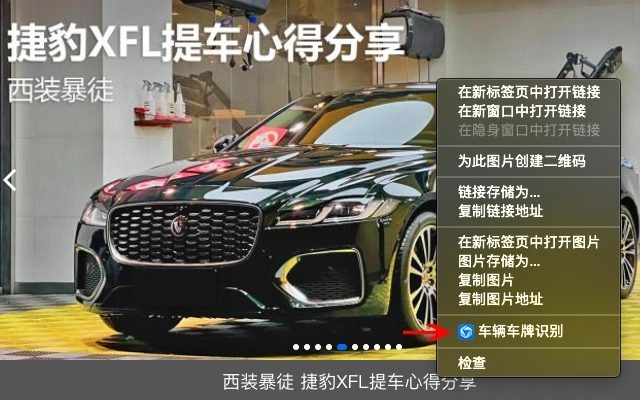

Right-Click Vehicle Info with AI
With a simple right-click on a vehicle image, this desktop application leverages Tencent Cloud’s AI content recognition to instantly retrieve vehicle details. Designed for users who frequently encounter vehicle images online, it offers a streamlined way to access information such as make, model, and license plate data directly from images. The tool is particularly useful for researchers, content creators, and law enforcement personnel who need quick access to vehicle metadata.
It supports multiple vehicle details and provides a confidence score for each recognition result, helping users assess accuracy. The integration with Tencent Cloud’s AI ensures real-time processing, though results are not guaranteed to be fully accurate. The tool is optimized for images of vehicles in clear, well-lit conditions, and is especially effective for Chinese license plates.
Users should verify all results independently, as the system is intended for reference only. The application is lightweight and designed for seamless use within desktop workflows.
Key Features & Capabilities
- AI-Powered Vehicle Recognition – Uses Tencent Cloud’s AI engine to analyze vehicle images and extract relevant data such as make, model, and license plate information upon right-click.
- Real-Time Results with Confidence Scores – Returns recognition confidence levels for each detected vehicle attribute, enabling users to assess the reliability of the output.
- Multi-Info Output – Displays multiple possible vehicle matches when available, supporting comparative analysis and better decision-making.
- One-Click Copy Functionality – Allows instant copying of recognized data to the clipboard, improving workflow efficiency for documentation and reporting.
- Seamless Desktop Integration – Operates directly from the right-click context menu, minimizing disruption to existing workflows.
The tool is ideal for users who need to extract vehicle details from images quickly, such as journalists verifying vehicle sources, investigators analyzing traffic footage, or content creators sourcing accurate vehicle data. Its lightweight design ensures minimal system impact, and the integration with Tencent Cloud enables fast processing. However, accuracy depends on image quality and the presence of valid Chinese license plates. The tool does not process non-Chinese plates and is not intended for official or legal verification.
User Interface, Workflow & Performance
The user interface is minimal and context-driven, relying entirely on the right-click context menu for activation. No separate dashboard or configuration panel is present, ensuring a distraction-free experience. Navigation is intuitive—users simply select an image file or thumbnail in a file explorer or image viewer, right-click, and choose the tool from the menu.
The response time is consistent with typical web API interactions, though exact performance metrics were not specified. The application runs efficiently without consuming significant system resources, and the developer did not specify resource usage details. Stability appears to be maintained through lightweight execution, but no long-term usage reports were provided.
The workflow is designed for speed, reducing steps from image selection to data extraction to a single action. Users are not required to open a separate application or upload files manually, making it ideal for high-throughput tasks.
Compatibility & System Requirements
The software is compatible with both Windows and Mac operating systems, supporting the latest versions of each platform. The installation package is 2.3 MB in size, indicating a lightweight footprint. The developer did not provide additional system requirements, so users should ensure their system meets basic desktop application standards.
No specific hardware specifications were listed, and compatibility with older OS versions was not confirmed. Platform compatibility information is limited to the provided list. The application is designed to function within standard desktop environments and integrates with common image file formats, though the exact list of supported formats was not specified.
Pros and Cons
Pros
- Simple right-click access for instant vehicle information retrieval
- Free to use with no hidden costs
- Lightweight at only 2.3 MB
- Provides confidence scores for recognition accuracy
- Supports multiple vehicle data outputs and one-click copying
Cons
- Only effective for Chinese license plates
- Results are not guaranteed to be accurate
- No support for non-Chinese vehicle plates
- Relies on external AI service with potential latency
- Limited to images with clear vehicle details
FAQ Section
Is the tool free to use?
Yes, the software is completely free to download and use with no subscription or hidden fees.
Which operating systems does it support?
The application is compatible with both Windows and Mac operating systems.
Does it work with all types of vehicle license plates?
No, the tool is designed to recognize only Chinese license plates. It does not support plates from other countries or regions.
How accurate are the results?
Results are based on AI recognition and are provided as reference only. Accuracy depends on image quality and may vary. Users should verify all information independently.
Is an internet connection required?
Yes, the tool relies on Tencent Cloud’s AI recognition service, so an active internet connection is necessary for all operations.
Final Thoughts
This desktop application delivers a powerful yet simple solution for extracting vehicle information from images using AI. Its right-click integration makes it ideal for users who need fast access to vehicle data without switching tools. While it is limited to Chinese license plates and does not guarantee accuracy, its free access, lightweight design, and real-time confidence scores make it a valuable utility for specific use cases.
It stands out for its seamless workflow and minimal system impact. For users focused on Chinese vehicle data, this tool offers a convenient, no-cost way to enhance productivity. However, it should not be used for official or legal purposes.
Download Right-Click Vehicle Info with AI now to streamline your image-based vehicle research.







